
What's new at a glance
Quantum Spot Rates — Flexible weight validation
Request quote updates when shipment weight changes
The Quantum spot rate booking flow now supports flexible chargeable weight validation when converting a quotation into a booking.
CargoMART automatically checks the shipment's chargeable weight against the tolerance defined in the original quote.
If the updated weight remains within the allowed tolerance, the booking proceeds as usual.
If the weight exceeds the permitted threshold, the booking flow switches to a "Request Quote Update" action, allowing you to submit the revised weight to the airline for approval.
Both the update request and the airline's response are recorded in the quotation's action timeline.
Manage shipment weight changes without losing track of your quotation. When an adjustment exceeds the airline's accepted tolerance, you can request an updated quote directly through the booking workflow while keeping a clear record of the exchange.
Local Charges — Import/Export filtering
Filter local charges by Import or Export
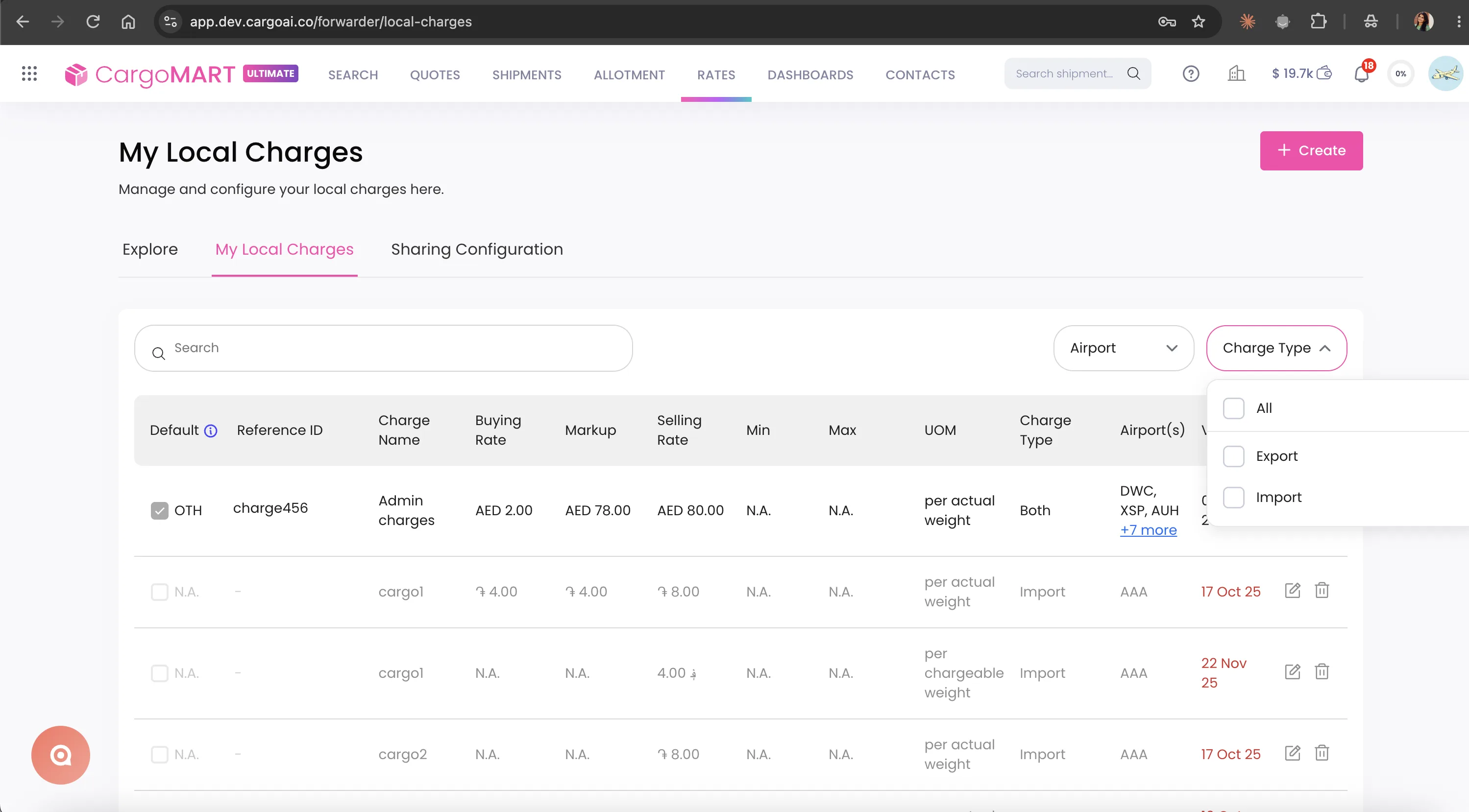
The Local Charges Explore tab now includes a dedicated Import/Export charge type filter.
You can narrow your search to the type of local charges you need, alongside the existing Country, Company, and Network filters.
Find relevant local charges faster without browsing through unrelated services. Whether you're looking for import or export charges, the new filter helps you focus on the information that matters to your shipment.
Go to Local Charges → Explore and use the Import/Export filter.
Rate Management System
Two improvements to RMS this month, giving forwarders more flexibility when sharing contract rates across offices and managing internal pricing within their organization.
Company ID support for Contract, Adhoc, and Consol rates
The RMS now supports Company ID as an additional identifier when uploading Contract, Adhoc, and Consol rates.
Instead of entering individual office identifiers, you can use a Company ID to make a rate available to eligible offices within the same forwarder company, based on the specified origin country.
The rate upload template now includes an updated column labeled "IATA-CASS or Company ID".
Existing visibility rules using full IATA-CASS numbers or 7-digit IATA numbers continue to work as usual.
Share rates across eligible offices more efficiently without listing every office individually. This simplifies rate uploads and reduces administrative work for forwarders managing multiple locations.
Internal forwarder rates with inter-office visibility
CargoMART now supports Internal (ISR) rates, allowing forwarder procurement teams to manage internal transfer pricing between offices.
These rates are automatically visible to both the origin and destination offices of the same company, while remaining private to that organization.
In RMS, internal rates appear at the top of the rate list under your company's name and logo, with a dedicated "Internal" badge.
The airline column has been renamed "Airline/Fwd" to accommodate both airline and forwarder rates.
Users from the originating office can edit internal rates directly, with changes saved automatically through RMS. Destination offices can view the rates but cannot modify them.
Manage internal buying rates alongside airline pricing in one place. Improve visibility across your office network while maintaining control over who can edit internal rate information.
Go to Rates → Rate Management System. Internal rates appear in both Accordion and Table views for eligible offices.
Quotation — Customer-specific airfreight markups
Set different airfreight margins for each customer group
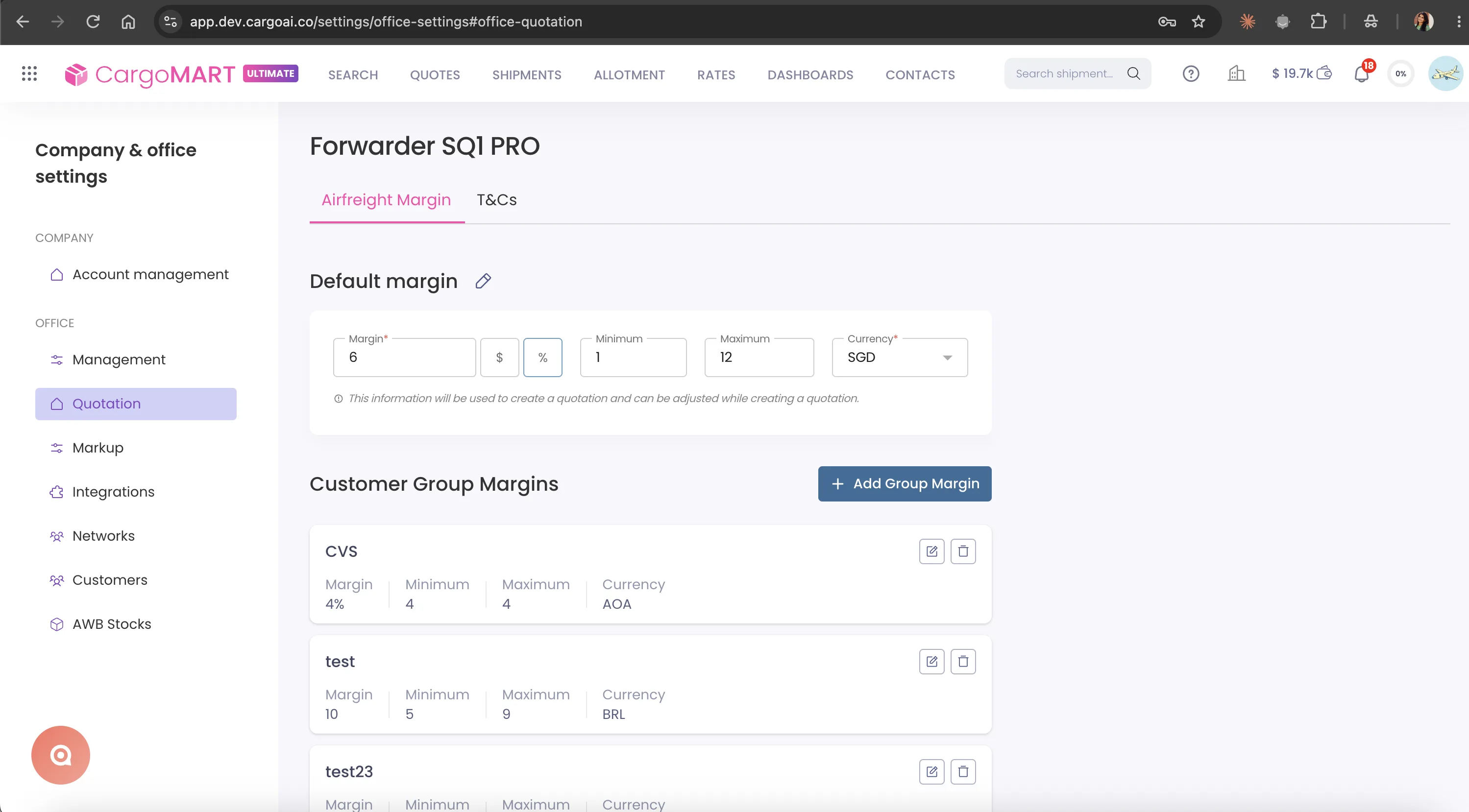
CargoMART now lets you configure specific airfreight markups for individual customer groups directly from your quotation office settings.
Alongside your office-wide default margin, you can create, edit, or delete markup rules for different customer groups.
When you create a quotation for a shipper belonging to a configured group, CargoMART automatically pre-fills the airfreight margin in Step 2 using that group's settings.
If no specific markup has been configured, the office's default margin is applied.
The pre-filled margin remains editable during quotation creation.
Apply consistent pricing strategies across different customer segments without manually adjusting margins for every quotation. Save time, reduce pricing inconsistencies, and retain the flexibility to adapt margins when needed.
Configure customer group markups in Office Settings → Quotation. The corresponding margin is automatically applied in Step 2 when creating a quotation.
Search Enhancements
Two improvements to CargoMART search results this month, making it easier to understand premium airline services and identify contracted pricing.
Airline-specific premium product descriptions
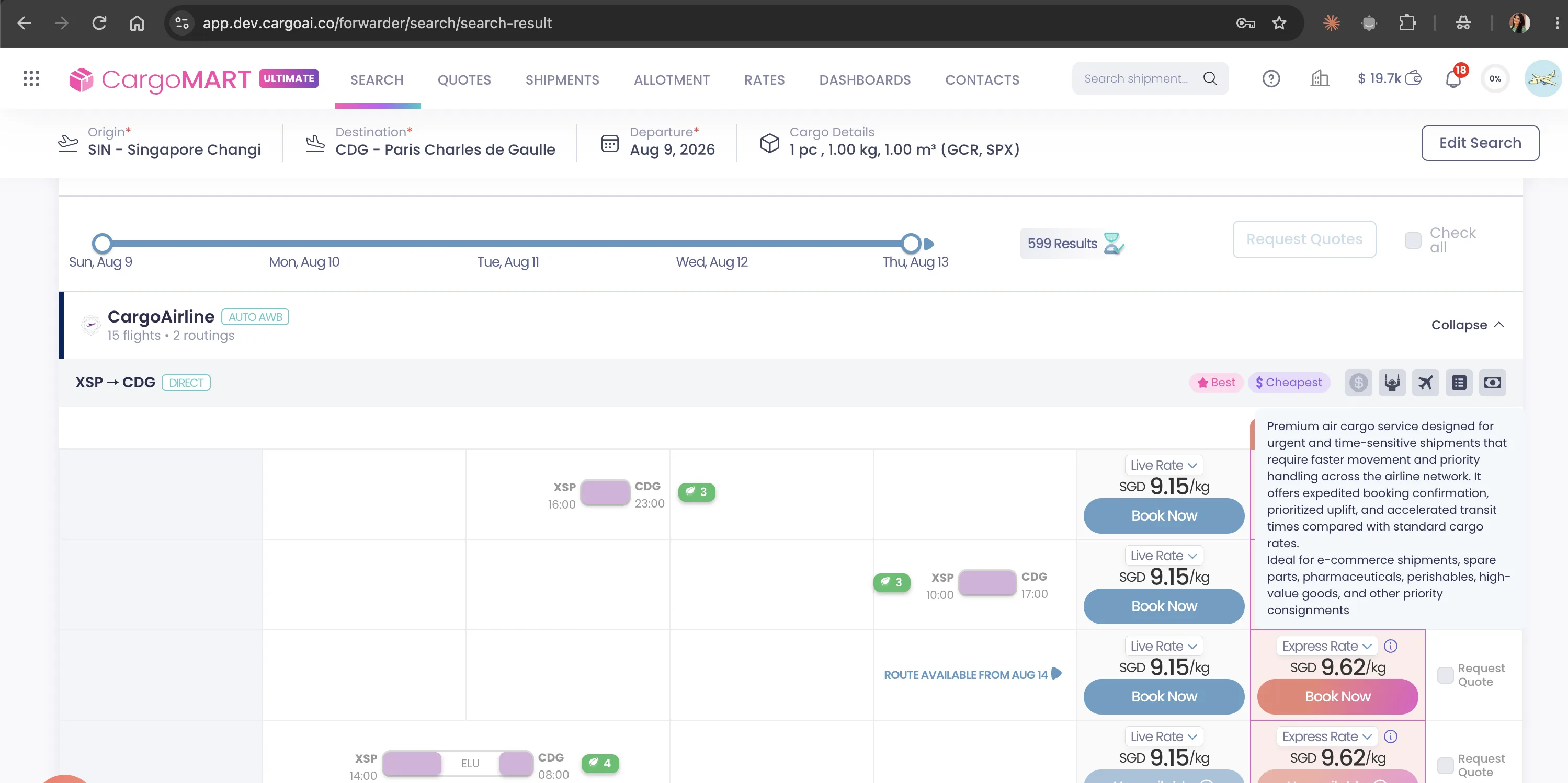
The Premium Solution column in CargoMART search results now displays a short description of each airline's premium product when available.
These descriptions highlight the services included in the premium offering, such as guaranteed space or priority handling.
The information is specific to each airline and corresponds to the premium product returned in the search results.
Understand what you're getting with each premium airline option before booking. Compare service benefits more easily and select the product that best matches your shipment requirements.
New Contract Rates filter
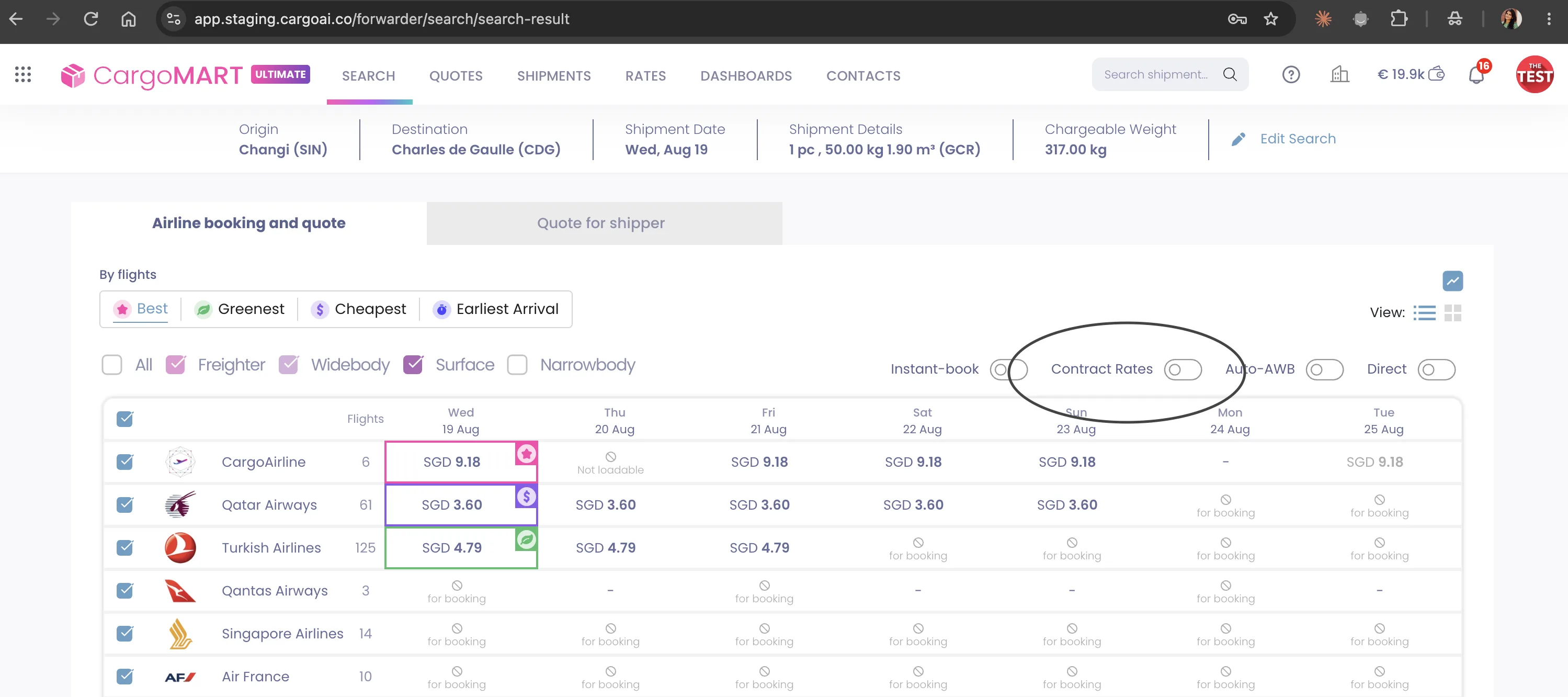
A new Contract Rates filter is now available on the CargoMART search results page.
When enabled, the filter displays flight options where your company has an existing contracted rate with the airline.
Quickly identify contracted pricing without manually reviewing every search result. Focus on the airline rates already negotiated by your organization and compare relevant booking options more efficiently.
Run a search in CargoMART and enable the Contract Rates filter on the results page.
AI Assistant
Two improvements to the CargoMART AI Assistant this month, making it more helpful for everyday product questions and more reliable when managing shipment notifications.
Get answers to CargoMART product questions
The AI Assistant can now answer common questions about CargoMART features and workflows using information from the platform's knowledge base.
You can ask questions such as "Where are my bookings?" or "What is the Place Option for?" and receive guidance based on available help articles.
Find answers to common product questions without searching through documentation manually. Get guidance directly from the AI Assistant while working in CargoMART.
Open the CargoMART AI Assistant and ask a question about a feature or workflow.
Reliable shipment notification unsubscribe
Unsubscribing from shipment notifications through the AI Assistant now reliably stops future notification emails for the specified AWB and email address.
Once the Assistant confirms that the unsubscribe request has been completed, no further shipment notification emails are sent for that subscription.
Manage shipment notifications with greater confidence. When you unsubscribe through the AI Assistant, your preference is correctly applied without additional steps.
Upgrade
From more flexible rate management and customer-specific quotations to smarter search filters and improved AI assistance, August's CargoMART updates are designed to give you greater control over your daily air cargo operations.
Explore the latest features in your CargoMART workspace and discover how CargoMART can help your team work more efficiently.